
Make an Instagram carousel from a gallery
Build carousel slides from a gallery's photos with ready layouts, a title slide or a panorama, then download them all as images.
Click Make a carousel at the top of any gallery with photos. Flashslash starts you with five slides from the gallery's first photos.
Build it
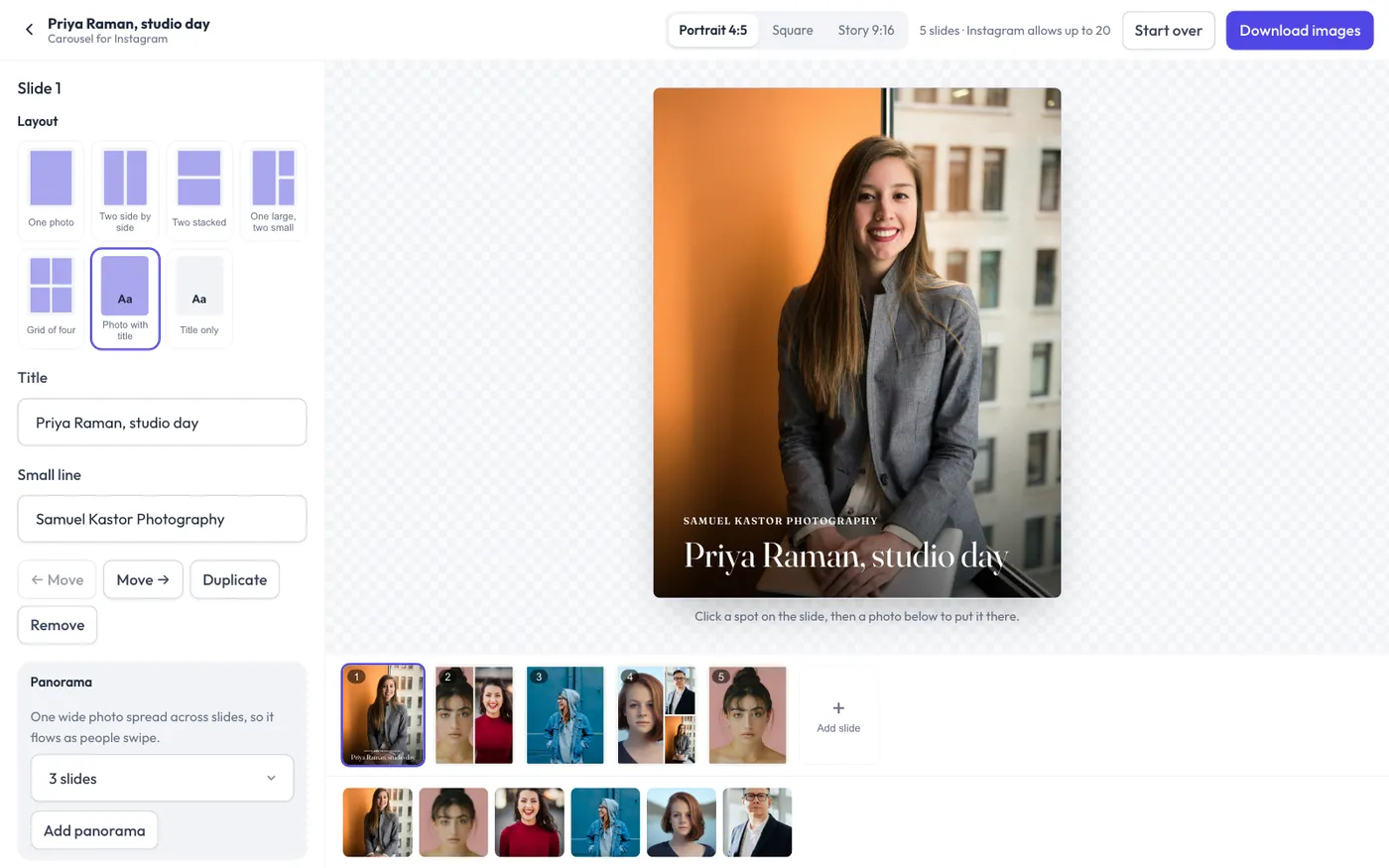
- Size: Portrait 4:5 (best for Instagram posts), Square or Story 9:16, at the top.
- Slides: click a slide in the strip to edit it. Use Add slide, Duplicate, Move and Remove. Instagram allows up to 20.
- Layout: one photo, two side by side, two stacked, one large with two small, a grid of four, a photo with a title, or a title on its own.
- Photos: click a spot on the slide, then click a photo in the row at the bottom to put it there.
- Panorama: pick 2 to 5 slides and click Add panorama. One photo spreads across them, so it flows as people swipe.
- Every slide: the background and text colors, the space around photos, and the title font.
Download
Click Download images. You get a zip with one image per slide, numbered in order, ready to post. Your carousel stays on this device while you work, so you can come back to it.
Still have a question? support@flashslashapp.com