
Add a Meta Pixel or Google Analytics
Measure your ads by adding your Meta Pixel ID or Google Analytics ID to your website.
If you run Facebook, Instagram or Google ads, you can add your tracking IDs so the ads know when someone sends an inquiry or books.
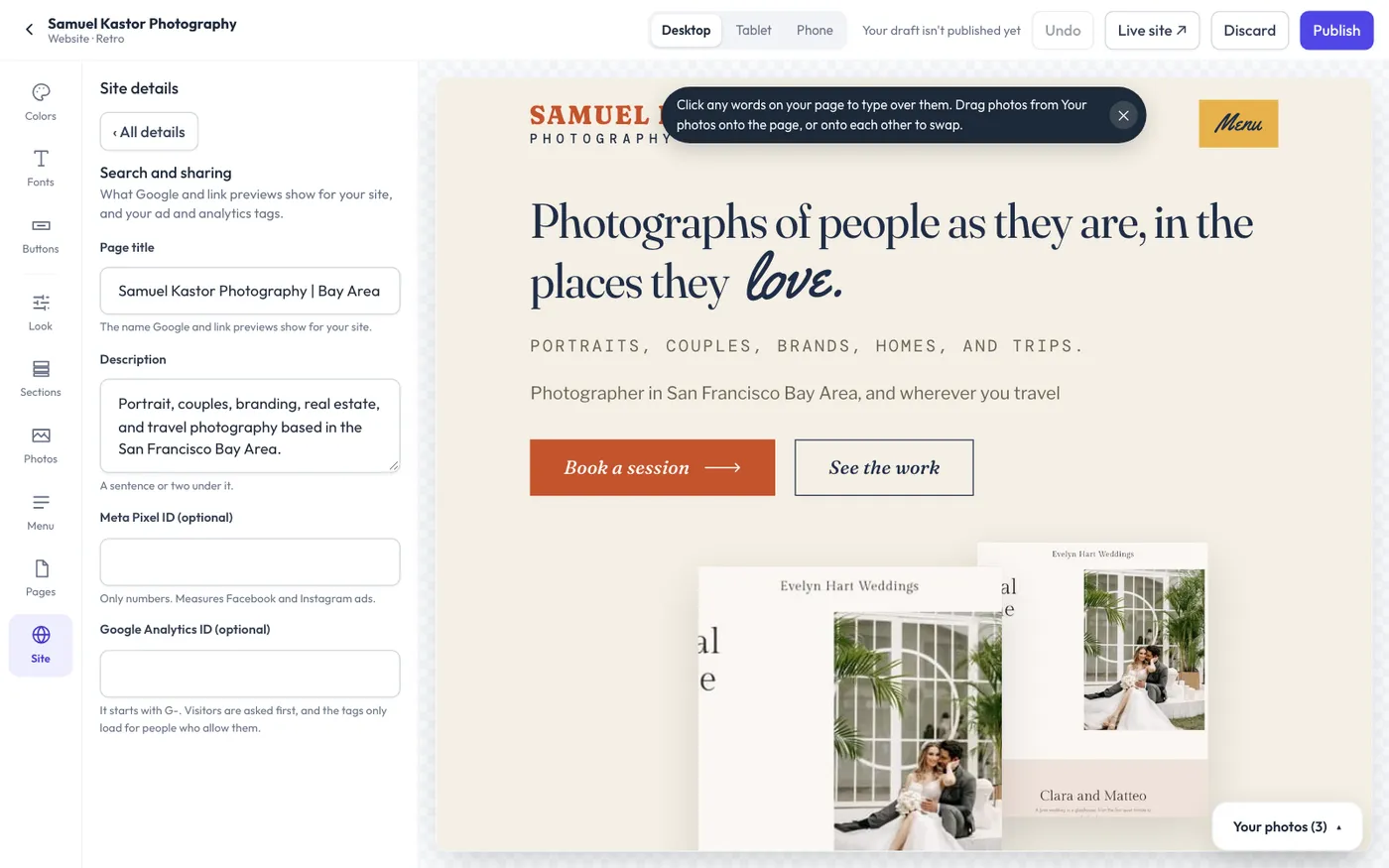
Add your IDs
- Open Website > Edit website and choose Site > Search and sharing.
- Type your Meta Pixel ID (optional). It's a number, from Meta Events Manager.
- Type your Google Analytics ID (optional). It starts with G-.
- Click Publish at the top to put them live.
What they record
- Every page visit on your website.
- Lead when someone sends your contact form.
- Schedule when someone finishes a booking.
Visitors choose
When either ID is set, your website asks each visitor once whether to allow these cookies. The tags only load for people who tap Allow; anyone who says no isn't tracked. Visitors can change their mind with the Change your cookie choice button on your privacy page, which also says you use these tools.
Because some visitors say no, Meta and Google will count fewer visits and leads than really happen. Flashslash's own visitor counts (Website > Visits) need no cookies and count everyone.
They only run on your public website, never in galleries, the client portal or your admin.